Pixels to 3D to Reasoning.
One Platform.
Run and chain AI models across images, video, 3D geometry, reasoning, and more. Build multimodal pipelines on a single platform without stitching together models, providers, or infrastructure.
A reasoning model decides, the vision and 3D models do the work
Each step takes the one before it by id. These are the real outputs.
A photo of a room in, the damaged chair in 3D out. Four steps, about nine cents.
- 1Reasoning

“yellow armchair”: visible white scratches and scuff marks along the armrests
Ask
gemini-3.8-flashLooks at the room and picks the piece of furniture that's damaged.
- 2Vision
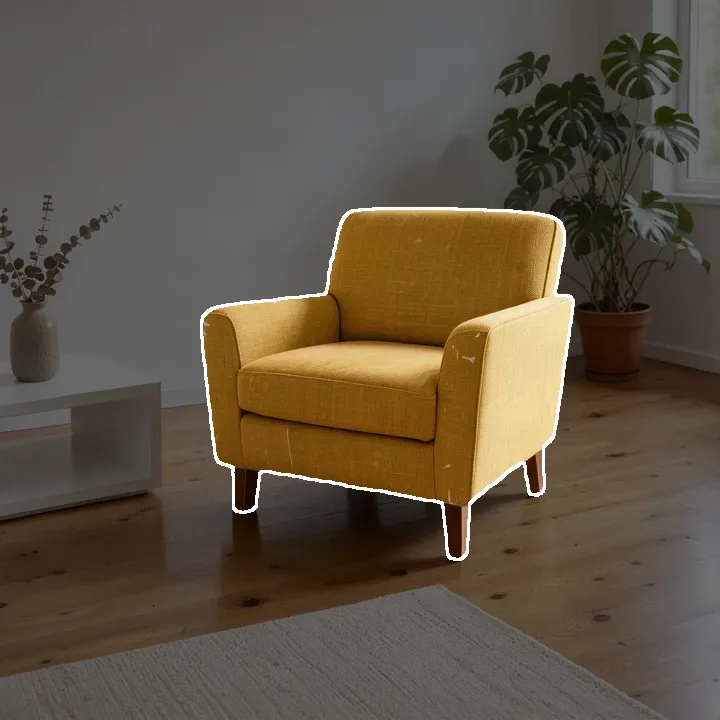
Find
sam3-segmentSegments what the model named.
- 3Image op
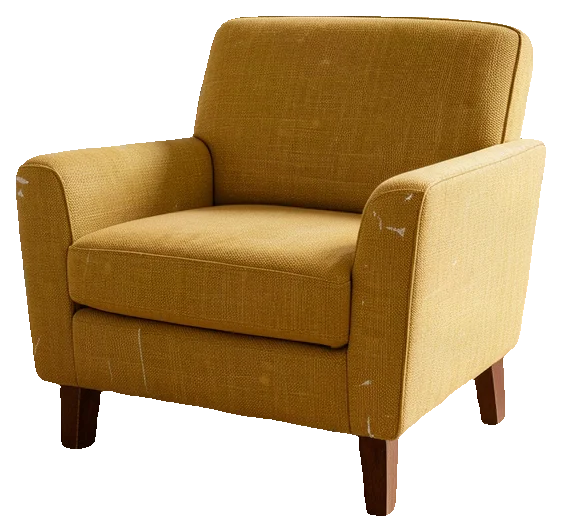
Cut out
image-cutoutLifts it out by its mask, on a clean background.
- 43D
Build
trellis-2Turns the cut-out into a textured 3D model.
pip install factorial-computeimport json
from factorial_compute import Client
f = Client() # reads FACTORIAL_API_KEY
# A path, a URL, or bytes: the client uploads it for you
ask = f.run(model="gemini-3.8-flash", input={
"image": "room.jpg", "response_format": {"type": "json_object"},
"prompt": 'Which piece of furniture in this room looks damaged or worn? '
'Answer as JSON: {"object": a short name for it, "why": what you see}'})
pick = json.loads(ask.text)["object"] # "yellow armchair"
seg = f.run(model="sam3-segment", input={
"image": "room.jpg", "objects": [{"id": "pick", "text": pick}]})
cut = f.run(model="image-cutout", input={
"image": "room.jpg", "mask": seg.id, "object": "pick", "crop": True})
mesh = f.run(model="trellis-2", input={
"image": cut.id, "vertices": 40000, "texture_size": 1024})
mesh.mesh.save("chair.glb")// upload() and run(): the two functions in the docs' Quickstart
const photo = await upload("room.jpg");
const ask = await run("gemini-3.8-flash", {
image: photo, response_format: { type: "json_object" },
prompt: "Which piece of furniture in this room looks damaged or worn? " +
'Answer as JSON: {"object": a short name for it, "why": what you see}' });
const pick = JSON.parse(ask.output.text).object; // "yellow armchair"
const seg = await run("sam3-segment", {
image: photo, objects: [{ id: "pick", text: pick }] });
const cut = await run("image-cutout", {
image: photo, mask: seg.id, object: "pick", crop: true });
const mesh = await run("trellis-2", {
image: cut.id, vertices: 40000, texture_size: 1024 });API=https://api.factorialcompute.com
AUTH="Authorization: Bearer $FACTORIAL_API_KEY"
# Upload the photo; the answer's "id" is its media id
curl $API/v1/media?kind=image -H "$AUTH" -F file=@room.jpg
# 1. Ask which piece is damaged -> {"object": "yellow armchair", ...}
curl $API/v1/executions -H "$AUTH" -H "Content-Type: application/json" \
-d '{"model": "gemini-3.8-flash",
"input": {"image": "med_...", "response_format": {"type": "json_object"},
"prompt": "Which piece of furniture in this room looks damaged or worn? Answer as JSON: {\"object\": a short name for it, \"why\": what you see}"}}'
# 2. Find it -> "id": "exec_SEG"
curl $API/v1/executions -H "$AUTH" -H "Content-Type: application/json" \
-d '{"model": "sam3-segment",
"input": {"image": "med_...", "objects": [{"id": "pick", "text": "yellow armchair"}]}}'
# 3. Cut it out of the photo -> "id": "exec_CUT"
curl $API/v1/executions -H "$AUTH" -H "Content-Type: application/json" \
-d '{"model": "image-cutout",
"input": {"image": "med_...", "mask": "exec_SEG", "object": "pick", "crop": true}}'
# 4. Make it a 3D model
curl $API/v1/executions -H "$AUTH" -H "Content-Type: application/json" \
-d '{"model": "trellis-2",
"input": {"image": "exec_CUT", "vertices": 40000, "texture_size": 1024}}'A warehouse clip in, everything that moves followed. Two steps, 307 frames, about thirty cents.
- 1Reasoning
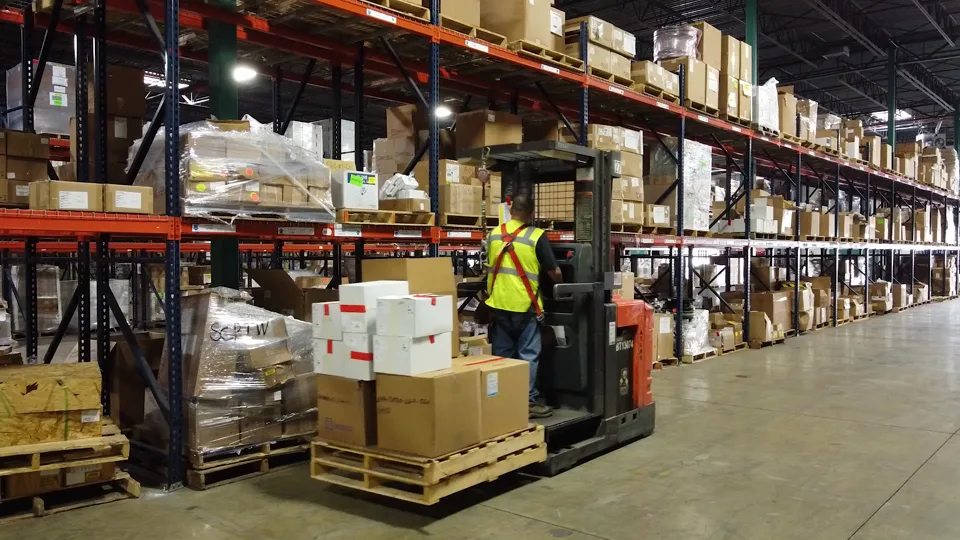
Follow: “forklift”, “worker”
Ask
gemini-3.8-flashWatches the clip and names what a warehouse would want to follow.
- 2Vision
Track
sam3-trackFollows each one through every frame: its mask, and a box in each frame.
pip install factorial-computeimport json
from factorial_compute import Client
f = Client() # reads FACTORIAL_API_KEY
ask = f.run(model="gemini-3.8-flash", input={
"video": "warehouse.mp4", "response_format": {"type": "json_object"},
"prompt": 'What moves in this clip that a warehouse would want to follow? '
'Answer as JSON: {"follow": [up to three short names, e.g. "forklift"]}'})
names = json.loads(ask.text)["follow"] # ["forklift", "worker"]
tracks = f.run(model="sam3-track", input={
"video": "warehouse.mp4", "objects": [{"id": n, "text": n} for n in names]})
for track in tracks.tracks:
track.save(f"{track.id}.mp4") # its mask, frame by frame
print(track.id, track.boxes[0]) # and a box in every frame// upload() and run(): the two functions in the docs' Quickstart
const clip = await upload("warehouse.mp4", "video");
const ask = await run("gemini-3.8-flash", {
video: clip, response_format: { type: "json_object" },
prompt: "What moves in this clip that a warehouse would want to follow? " +
'Answer as JSON: {"follow": [up to three short names, e.g. "forklift"]}' });
const names = JSON.parse(ask.output.text).follow; // ["forklift", "worker"]
const tracks = await run("sam3-track", {
video: clip, objects: names.map((n) => ({ id: n, text: n })) });
for (const t of tracks.output.objects) console.log(t.id, t.boxes[0]);API=https://api.factorialcompute.com
AUTH="Authorization: Bearer $FACTORIAL_API_KEY"
# Upload the clip; the answer's "id" is its media id
curl $API/v1/media?kind=video -H "$AUTH" -F file=@warehouse.mp4
# 1. Ask what to follow -> {"follow": ["forklift", "worker"]}
curl $API/v1/executions -H "$AUTH" -H "Content-Type: application/json" \
-d '{"model": "gemini-3.8-flash",
"input": {"video": "med_...", "response_format": {"type": "json_object"},
"prompt": "What moves in this clip that a warehouse would want to follow? Answer as JSON: {\"follow\": [up to three short names]}"}}'
# 2. Follow each one through every frame: a box per frame, and a mask video
curl $API/v1/executions -H "$AUTH" -H "Content-Type: application/json" \
-d '{"model": "sam3-track",
"input": {"video": "med_...", "objects": [{"id": "forklift", "text": "forklift"},
{"id": "worker", "text": "worker"}]}}'One photo of a room in, the whole room in 3D out. Three steps, about eight cents.
- 1Reasoning

“dark grey sofa on the right”, “wooden coffee table in the center” … six in all
Ask
gemini-3.8-flashLists each piece of furniture, saying where it is.
- 2Vision
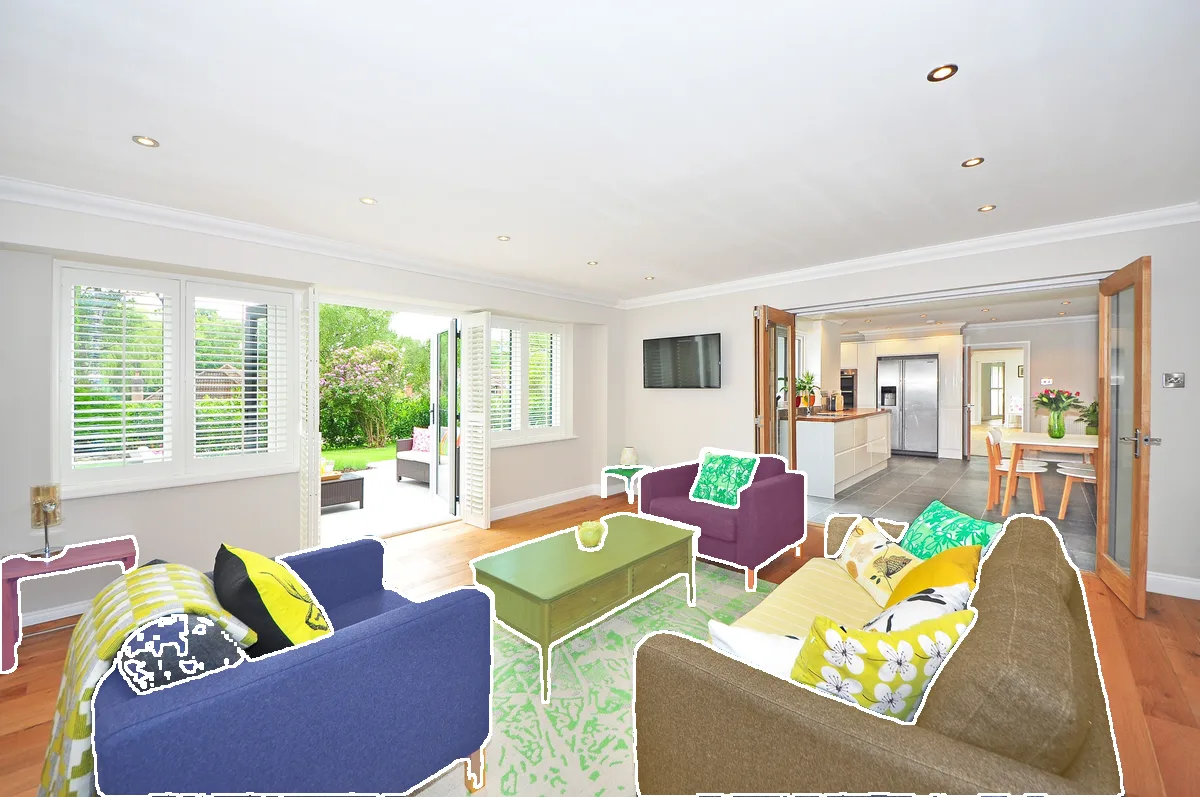
Find
sam3-segmentSegments each piece it listed.
- 33D
Build
sam3d-objectsEvery piece in 3D, each placed where it stands.
pip install factorial-computeimport json
from factorial_compute import Client
f = Client() # reads FACTORIAL_API_KEY
ask = f.run(model="gemini-3.8-flash", input={
"image": "living-room.jpg", "response_format": {"type": "json_object"},
"prompt": 'List each piece of furniture in this room, one entry per piece, saying where '
'it is (e.g. "grey sofa on the left"). Answer as JSON: {"furniture": [...]}'})
pieces = json.loads(ask.text)["furniture"] # six, each told apart
seg = f.run(model="sam3-segment", input={
"image": "living-room.jpg",
"objects": [{"id": f"piece-{i}", "text": p} for i, p in enumerate(pieces)]})
scene = f.run(model="sam3d-objects", wait=False, input={
"image": "living-room.jpg", "mask": {"execution": seg.id}, "textured": True}).wait()
scene.mesh.save("living-room.glb") # every piece, placed where it stands// upload() and run(): the two functions in the docs' Quickstart
const photo = await upload("living-room.jpg");
const ask = await run("gemini-3.8-flash", {
image: photo, response_format: { type: "json_object" },
prompt: "List each piece of furniture in this room, one entry per piece, saying where " +
'it is (e.g. "grey sofa on the left"). Answer as JSON: {"furniture": [...]}' });
const pieces = JSON.parse(ask.output.text).furniture;
const seg = await run("sam3-segment", {
image: photo, objects: pieces.map((p, i) => ({ id: "piece-" + i, text: p })) });
// Minutes, not seconds: if it comes back "running", GET /v1/executions/{id} until done
const scene = await run("sam3d-objects", {
image: photo, mask: { execution: seg.id }, textured: true });API=https://api.factorialcompute.com
AUTH="Authorization: Bearer $FACTORIAL_API_KEY"
# Upload the photo; the answer's "id" is its media id
curl $API/v1/media?kind=image -H "$AUTH" -F file=@living-room.jpg
# 1. Ask for each piece -> {"furniture": ["grey sofa on the right", ...]}
curl $API/v1/executions -H "$AUTH" -H "Content-Type: application/json" \
-d '{"model": "gemini-3.8-flash",
"input": {"image": "med_...", "response_format": {"type": "json_object"},
"prompt": "List each piece of furniture in this room, one entry per piece, saying where it is. Answer as JSON: {\"furniture\": [...]}"}}'
# 2. Find each piece -> "id": "exec_SEG"
curl $API/v1/executions -H "$AUTH" -H "Content-Type: application/json" \
-d '{"model": "sam3-segment",
"input": {"image": "med_...", "objects": [{"id": "piece-0", "text": "grey sofa on the right"}, ...]}}'
# 3. Every piece in 3D, placed where it stands - one GLB
curl $API/v1/executions -H "$AUTH" -H "Content-Type: application/json" \
-d '{"model": "sam3d-objects", "wait": false,
"input": {"image": "med_...", "mask": {"execution": "exec_SEG"}, "textured": true}}'A robot episode in, labeled as a training set needs it. Two steps, about twenty-one cents.
- 1Reasoning
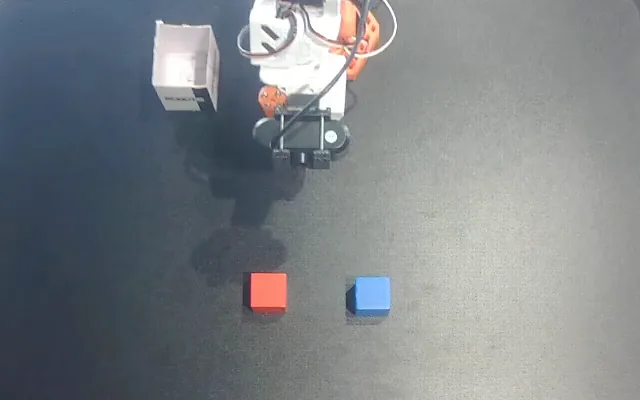
6 subtasks, from “reach the red cube” to “release”. Success: true. Follow: “robot arm”, “red cube”
Label
gemini-3.8-flashWatches the episode: each subtask with its start and end, whether it succeeded, and what to follow.
- 2Vision
Track
sam3-trackFollows the arm and the cube through all 224 frames, under the subtasks the model labeled.
pip install factorial-computeimport json
from factorial_compute import Client
f = Client() # reads FACTORIAL_API_KEY
label = f.run(model="gemini-3.8-flash", input={
"video": "episode.mp4", "response_format": {"type": "json_object"},
"prompt": 'A robot episode; its task was "Put the red cube on top of the blue cube." '
'Label it as a robot-learning dataset would: each subtask (reach, grasp, lift, move, '
'place, release - whichever happen) with when it starts and ends. Answer as JSON: '
'{"segments": [{"start_s": number, "end_s": number, "label": a short instruction}], '
'"success": true or false, "follow": [the robot arm and each object it moves, '
'each in one or two plain words, e.g. "robot arm"]}'})
episode = json.loads(label.text) # six subtasks, success: true
tracks = f.run(model="sam3-track", input={
"video": "episode.mp4",
"objects": [{"id": n, "text": n} for n in episode["follow"]]}) # robot arm, red cube
for s in episode["segments"]:
print(f'{s["start_s"]:5.1f}-{s["end_s"]:5.1f}s {s["label"]}')// upload() and run(): the two functions in the docs' Quickstart
const clip = await upload("episode.mp4", "video");
const label = await run("gemini-3.8-flash", {
video: clip, response_format: { type: "json_object" },
prompt: 'A robot episode; its task was "Put the red cube on top of the blue cube." ' +
"Label it as a robot-learning dataset would: each subtask (reach, grasp, lift, move, " +
"place, release - whichever happen) with when it starts and ends. Answer as JSON: " +
'{"segments": [{"start_s": number, "end_s": number, "label": a short instruction}], ' +
'"success": true or false, "follow": [the robot arm and each object it moves, ' +
'each in one or two plain words, e.g. "robot arm"]}' });
const episode = JSON.parse(label.output.text);
const tracks = await run("sam3-track", {
video: clip, objects: episode.follow.map((n) => ({ id: n, text: n })) });API=https://api.factorialcompute.com
AUTH="Authorization: Bearer $FACTORIAL_API_KEY"
# Upload the episode; the answer's "id" is its media id
curl $API/v1/media?kind=video -H "$AUTH" -F file=@episode.mp4
# 1. Label it: subtasks with times, success, what to follow
# -> {"segments": [{"start_s": 2.0, "end_s": 5.0, "label": "reach the red cube"}, ...],
# "success": true, "follow": ["robot arm", "red cube"]}
curl $API/v1/executions -H "$AUTH" -H "Content-Type: application/json" \
-d '{"model": "gemini-3.8-flash",
"input": {"video": "med_...", "response_format": {"type": "json_object"},
"prompt": "A robot episode; its task was ... Label it as a robot-learning dataset would ..."}}'
# 2. Follow the arm and the cube through every frame
curl $API/v1/executions -H "$AUTH" -H "Content-Type: application/json" \
-d '{"model": "sam3-track",
"input": {"video": "med_...", "objects": [{"id": "robot arm", "text": "robot arm"},
{"id": "red cube", "text": "red cube"}]}}'A product photo in, a physics answer out. Three steps, about nine cents.
- 1Reasoning
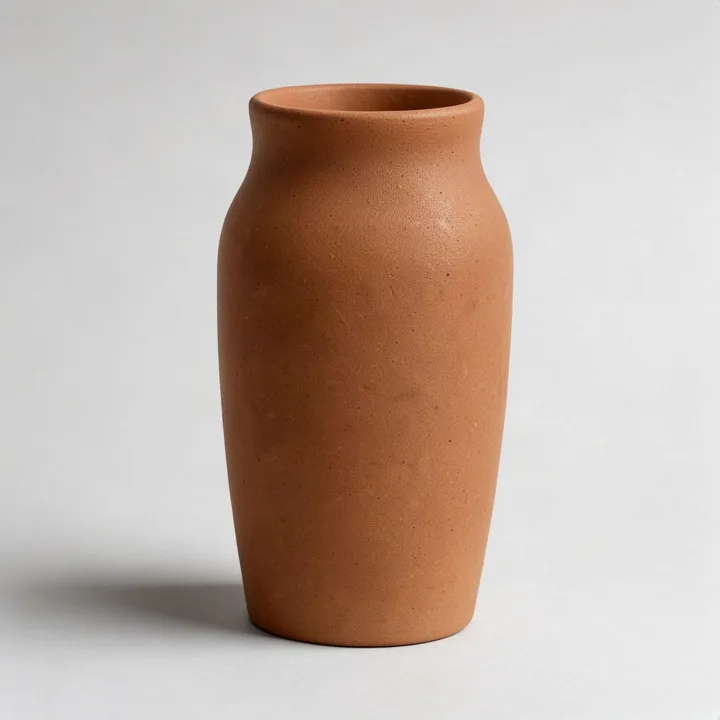
About 20 cm and 0.7 kg. On a 25° ramp: falls over
Ask
gemini-3.8-flashEstimates its real size and weight, and guesses whether it stays up on a 25° ramp.
- 23D
Build
trellis-2Turns the photo into a textured 3D model.
- 3Physics
Slides at 0.37 s, tips over at 0.43 s. Shown at half speed
Simulate
physics-simStands the model on a 25° slope, at its size and weight, and lets go.
pip install factorial-computeimport json
from factorial_compute import Client
f = Client() # reads FACTORIAL_API_KEY
ask = f.run(model="gemini-3.8-flash", input={
"image": "vase.png", "response_format": {"type": "json_object"},
"prompt": "Estimate this object's real size and weight, and predict whether it stays "
"upright if stood on a 25 degree ramp. Answer as JSON: {\"object\": short name, "
"\"height_m\": number, \"mass_kg\": number, \"stays_upright\": true or false, "
"\"why\": one sentence}"})
guess = json.loads(ask.text) # 0.2 m, 0.7 kg, stays_upright: false
mesh = f.run(model="trellis-2", input={
"image": "vase.png", "vertices": 40000, "texture_size": 1024})
sim = f.run(model="physics-sim", input={
"mesh": {"execution": mesh.id}, "scenario": "tilt", "tilt_deg": 25,
"height_m": guess["height_m"], "mass_kg": guess["mass_kg"], "duration_s": 1.0})
print(sim.simulation.events) # slides at 0.37 s, tips over at 0.43 s// upload() and run(): the two functions in the docs' Quickstart
const photo = await upload("vase.png");
const ask = await run("gemini-3.8-flash", {
image: photo, response_format: { type: "json_object" },
prompt: "Estimate this object's real size and weight, and predict whether it stays " +
"upright if stood on a 25 degree ramp. Answer as JSON: {\"object\": short name, " +
'"height_m": number, "mass_kg": number, "stays_upright": true or false, "why": one sentence}' });
const guess = JSON.parse(ask.output.text);
const mesh = await run("trellis-2", { image: photo, vertices: 40000, texture_size: 1024 });
const sim = await run("physics-sim", {
mesh: { execution: mesh.id }, scenario: "tilt", tilt_deg: 25,
height_m: guess.height_m, mass_kg: guess.mass_kg, duration_s: 1.0 });
console.log(sim.output.events);API=https://api.factorialcompute.com
AUTH="Authorization: Bearer $FACTORIAL_API_KEY"
# Upload the photo; the answer's "id" is its media id
curl $API/v1/media?kind=image -H "$AUTH" -F file=@vase.png
# 1. Ask its size and weight, and for a guess -> {"height_m": 0.2, "mass_kg": 0.7, "stays_upright": false, ...}
curl $API/v1/executions -H "$AUTH" -H "Content-Type: application/json" \
-d '{"model": "gemini-3.8-flash",
"input": {"image": "med_...", "response_format": {"type": "json_object"},
"prompt": "Estimate this object'\''s real size and weight, and predict whether it stays upright if stood on a 25 degree ramp. Answer as JSON: ..."}}'
# 2. Make it a 3D model -> "id": "exec_MESH"
curl $API/v1/executions -H "$AUTH" -H "Content-Type: application/json" \
-d '{"model": "trellis-2", "input": {"image": "med_...", "vertices": 40000, "texture_size": 1024}}'
# 3. Stand it on a 25-degree slope and see
curl $API/v1/executions -H "$AUTH" -H "Content-Type: application/json" \
-d '{"model": "physics-sim",
"input": {"mesh": {"execution": "exec_MESH"}, "scenario": "tilt", "tilt_deg": 25,
"height_m": 0.2, "mass_kg": 0.7, "duration_s": 1.0}}'What you can run
Over sixty models across pixels, 3D geometry, and tokens, priced per call with no minimums.
Vision
- Segmentation and masks
- Object detection
- Depth from one photo
- OCR and documents
- Video object tracking
Build in 3D
- Image to textured 3D model
- Gaussian splats
- Every object in a scene, placed
- People as 3D body meshes
Generate
- Image generation and editing
- Image to video
- Text to speech
- Background removal and upscaling
Reason
- Vision-language models
- Reasoning models
- Speech to text
- An OpenAI-compatible endpoint
What Factorial handles
So you build the product, not the plumbing between providers.
- Model execution
- GPUs, queues, retries, and provider integrations, behind one key and one bill.
- Chaining
- Pass one result straight into the next model by its id. Nothing is downloaded and uploaded again between steps.
- Typed outputs
- Masks, depth maps, meshes, and transcripts come back in the same shape, whichever model made them.
- State and intermediate files
- Each step's output stays on our side, addressable by id, to inspect, reuse in another call, or download - typed results until you delete them. Streamed answers are never stored.
Your coding agent already knows how to use it
One line sets up Claude Code, Codex, and Cursor with the models and how to chain them. Then ask in plain words.
$ curl -LsSf https://api.factorialcompute.com/install.sh | sh -s -- inv_…
Signed in. Set up Claude Code, Codex, and Cursor.
> Cut the armchair out of room.jpg and make it a 3D model.
In beta
Sign in to get started. We're letting people in a few at a time, with free credit to try it.
Get started